When did ‘better’ actually mean better?
John Deere Financial's credit analysts work in ABTools all day. The new web version looked cleaner, but was it actually easier to use? I tested the same four power users before and after launch. Usability jumped. Satisfaction barely moved, and the reason came down to one feature.
- Longitudinal study
- SUS benchmark
- Interviews
- Thematic analysis
Usability score (SUS, out of 100)
68 is the industry average. The old tool sat below it; the new one scored well above. Four users, so it's a strong signal, not final proof.
same 4 people, 8 months apart ↑
On this page
The short version
Usability rose from 60 to 85.6 and improved on all six dimensions. Satisfaction moved least (+3.8), and the interviews traced it to one feature: Notes.
- +25.6SUS points, 60 → 85.6
- +35System performance, the biggest gain
- +3.8Satisfaction, the smallest gain
- 16 of 35Remaining issues were about Notes
- Problem
- A redesign that looks newer isn't proof it works better, especially for experts with up to 20 years of habits.
- My role
- UX Researcher. Planned the study with the JDF product team, ran both waves, analysed and presented the results.
- Team
- JDF UX team, ABTools product team
- Timeline
- January to August 2021
- Methods
- Two-wave within-subjects study · SUS · six-dimension questionnaire · interviews · thematic analysis. Wave 2 came after 2–3 months of real use.
- Outcome
- SUS 60 → 85.6. All six usability dimensions improved. 35 remaining issues found, 16 of them about Notes.
- Decision it informed
- Notes became a high-priority backlog item, and the team moved toward continuous research after launch.
A UX team people liked, but didn’t yet rely on for evidence
While this study was running, the JDF UX team surveyed 40 product team members about working with UX (June 28 to July 6, 2021). The answers showed a gap this study could help close.
| Benefit | Count (of 40) |
|---|---|
| Helps me think with a user-centred mindset | 33 |
| Helps me plan product development efficiently | 22 |
| Helps me plan the roadmap | 19 |
| Helps me make evidence-based decisions | 11 |
Show the data
| Benefit | Count (of 40) |
|---|---|
| Helps me think with a user-centred mindset | 33 |
| Helps me plan product development efficiently | 22 |
| Helps me plan the roadmap | 19 |
| Helps me make evidence-based decisions | 11 |
liked for mindset… rarely for evidence. This study had to show the numbers.
Experts don’t forgive a pretty slowdown
Credit analysts make same-day decisions, sometimes in a 15-minute review, while taking 10 to 20 calls a day. Some had used the desktop ABTools for over 20 years. A post-launch survey alone couldn't tell real improvement apart from novelty or change aversion.
That was the decision to inform, and a generic post-launch survey could not answer it. Ratings taken right after a migration mix three things together. A one-shot study tells you about the learning curve, not the product. A two-wave study with a deliberate familiarization window can separate them.
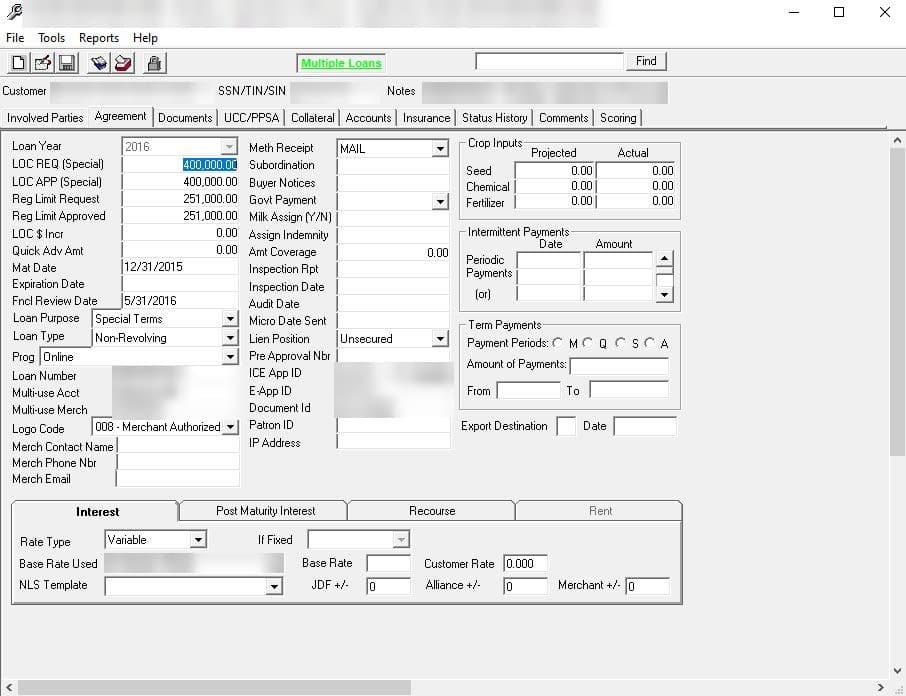
Ten tabs and dozens of fields, many never used in underwriting.
“There are 10 tabs in front of me, which one do I need?”
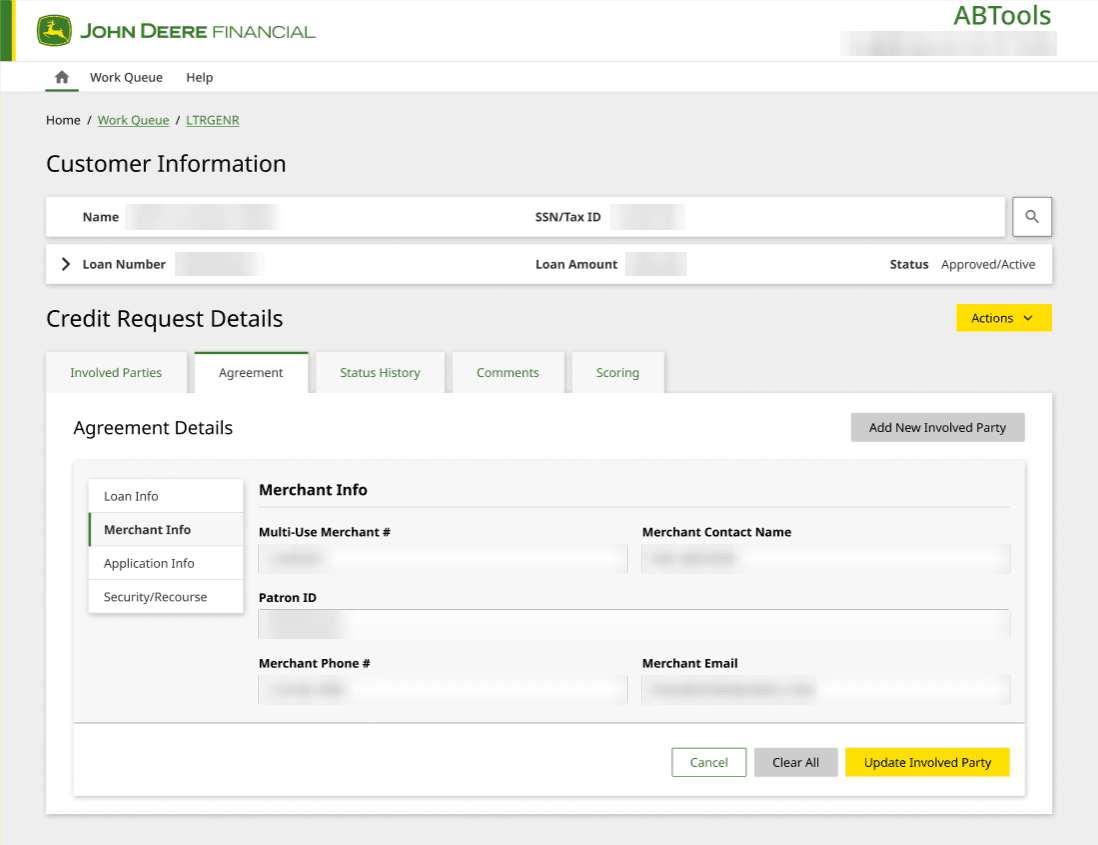
Same tab names, fewer fields, grouped into four sections.
“It is cleaned up, it is easier to find quickly.”
Novelty effect
New feels good, simply because it is new.
Change aversion
New feels wrong, simply because it is unfamiliar.
Genuine usability change
What is left once the first two have faded.
The questions I set out to answer
Did usability actually improve across the six dimensions the team cared about?
Which dimensions improved most, and which barely moved?
Where does friction remain in the daily workflow?
Measure the same people before and after
I planned the study with the JDF product team inside our usual discover → define → develop → deliver process. The key choice was timing: capture a baseline before launch, then wait until people had really used the new tool.
Two waves, same people. The same four participants evaluated both systems with identical instruments, in January (old ABTools) and August (new ABTools). Using the same people removes differences between groups as an explanation for any change.
A familiarization window. Participants began using the new ABTools in their real jobs in May and June. By the August evaluation they had about 2 to 3 months of working experience with it, enough for novelty and change aversion to fade.
Study timeline
- January 2021
Wave 1: baseline
Interviews, SUS and the six-dimension questionnaire on the old desktop tool.
- May–June 2021
Familiarity window
Participants used the new web tool in their real jobs for 2–3 months.
- August 2021
Wave 2: post-evaluation
The same instruments, the same four people, on the new tool.
waiting = fewer "it's new, I hate it" answers
- Wave 1 · Jan 2021 — Baseline on the old desktop toolDiscoveryDiscover → Define
- May–Jun 2021 — New web tool in real daily useDeliveryDevelop → Deliver
- Wave 2 · Aug 2021 — Same people, same questions, new toolMeasureDid it actually work?
findings feed the backlog and the next round
baseline = part of discovery · wave 2 = measuring the delivery
Instruments
System Usability Scale
Standardized 10-item scale (Lewis and Sauro, 2009), benchmarkable against industry (68), Global IT (63) and the FY21 target (67).
Custom Likert questionnaire
Six sections: Satisfaction, Ease of Use, Learnability, System Performance, Human Error Support, Productivity. Reported as % favorable.
Open-ended probes
Verbatims explain why scores moved, and surface what no rating scale asks about.
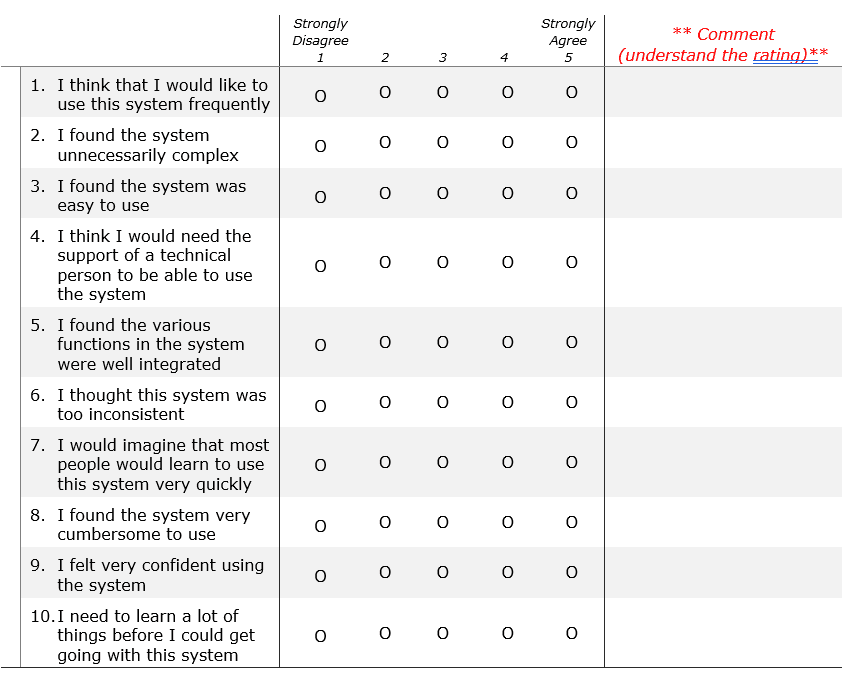
- 1 Intro, role, years with ABTools, hours a day
- 2 Six JDF dimensions, each rated, then "why?"
- 3 Improvement opportunities, open-ended
- 4 SUS, the 10 items
Design decisions, and what each one cost
Within-subjects
Why: Each person is their own comparison, so role and tenure don’t muddy the change.
Cost: Fixed order. The old tool was always rated first.
Familiarity window
Why: Lets novelty and change aversion fade before wave 2.
Cost: Other things change over months, too.
One power user per role
Why: Depth and full role coverage from people who live in the tool.
Cost: Four people can’t be generalised.
SUS + custom dimensions
Why: SUS gives a benchmark; six JDF dimensions show where it changed.
Cost: The custom scale isn’t validated.
% favourable reporting
Why: Easy for leadership to read at a glance.
Cost: Hides the spread of answers.
Interviews alongside scores
Why: Scores say how much; open probes say why.
Cost: One coder, no second check.
Show as a table
| Decision | Why | Cost |
|---|---|---|
| Within-subjects | Each person is their own comparison, so role and tenure don’t muddy the change. | Fixed order. The old tool was always rated first. |
| Familiarity window | Lets novelty and change aversion fade before wave 2. | Other things change over months, too. |
| One power user per role | Depth and full role coverage from people who live in the tool. | Four people can’t be generalised. |
| SUS + custom dimensions | SUS gives a benchmark; six JDF dimensions show where it changed. | The custom scale isn’t validated. |
| % favourable reporting | Easy for leadership to read at a glance. | Hides the spread of answers. |
| Interviews alongside scores | Scores say how much; open probes say why. | One coder, no second check. |
Four roles, decades of muscle memory
One daily power user per role, from 3.5 to more than 20 years with ABTools.
ABTools is part of their job, so they can't leave when something frustrates them. Their friction stays in the system, which is exactly why it's worth studying. Reviews can take as little as 15 minutes, so minutes of friction are a large share of each decision.
Decision-maker analyst
4 to 6 hrs / dayReviews applications, makes same-day decisions, spreads financials. Needs scannable notes and a fast personal worklist.
ABTools · MARS · CreditPathHigh-volume admin analyst
All dayAdmin work that differs from normal analysts; dealer and customer calls. Needs speed and no routing detours.
ABTools · ACAPSProcessing specialist
2 to 3 hrs / dayTurndown and counteroffer letters, bank rating, FileNet import. Needs reliable handoffs and errors that say what to do.
ABToolsManager
2 to 4 hrs / daySets up worklists, sets priority order, trains staff. Needs queue visibility, search that finds everyone, and export.
ABTools · ACAPSUser profiles, not personas: one person per role. Bars show tenure with ABTools.
Following one credit decision from queue to handoff
I mapped what participants told me onto their daily workflow. Most remaining friction clustered around reading history and moving through queues.
Work the queue
- Can't find own name in employee search
- Queue position lost after leaving
Open an application
- "Create new credit request" button didn’t work
Read the history
- Notes squashed into one paragraph
- Notes text doesn't scale with zoom
Decide and route
- Route-to-bottom option removed
- Overlays close only with X
Letters and handoff
- FileNet opens in a separate tab
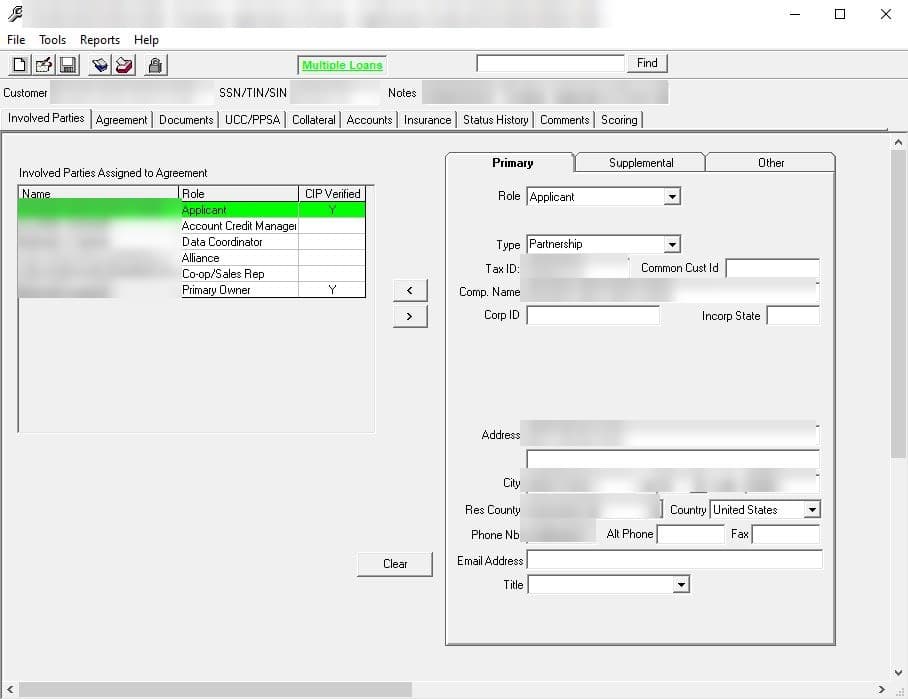
List and form squeezed side by side.
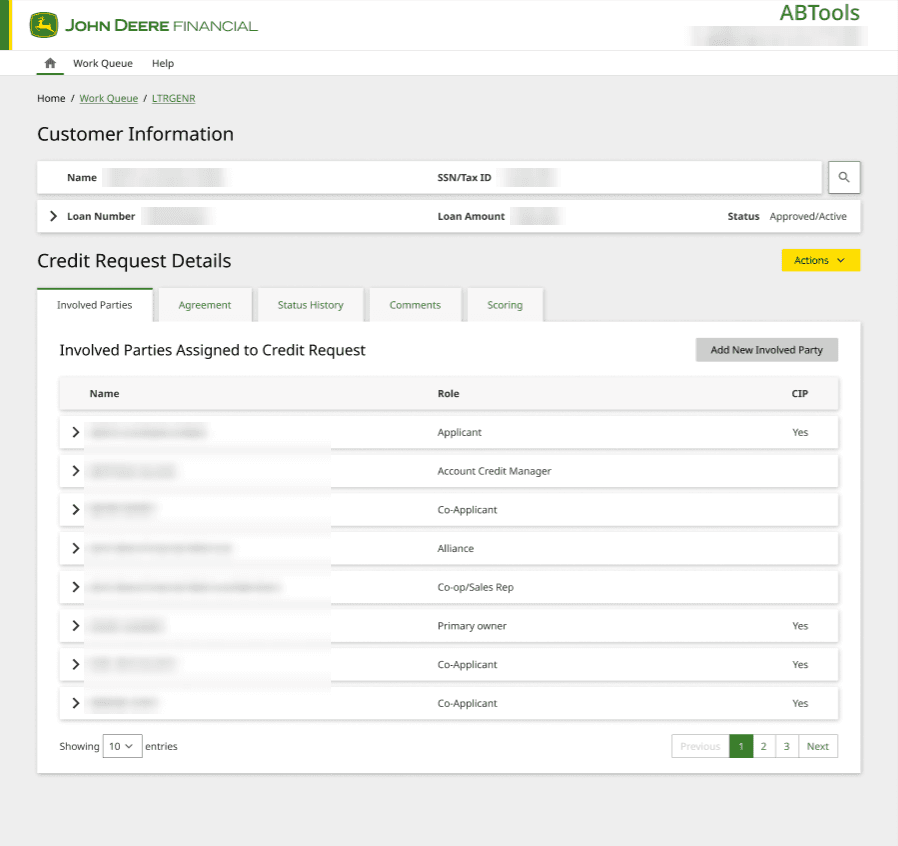
One clear table, details open on demand. Customer summary stays visible.
Usability went up. Satisfaction barely moved.
SUS rose from below every benchmark to above all of them. Every dimension improved, but by very different amounts. With four people, these are descriptive results, not statistical proof.
| Measure | Score |
|---|---|
| Previous ABTools | 60 |
| Global IT average | 63 |
| FY21 target | 67 |
| Industry average | 68 |
| Current ABTools | 85.6 |
Show the data
| Measure | Score |
|---|---|
| Previous ABTools | 60 |
| Global IT average | 63 |
| FY21 target | 67 |
| Industry average | 68 |
| Current ABTools | 85.6 |
| Dimension | Before % | After % | Change |
|---|---|---|---|
| System Performance | 62.5% | 97.5% | +35 |
| Human Error Support | 56.6% | 75% | +18.4 |
| Ease of Use | 75% | 88.7% | +13.7 |
| Learnability | 80% | 92.5% | +12.5 |
| Productivity | 71.2% | 82.5% | +11.3 |
| Satisfaction | 71.2% | 75% | +3.8 |
Show the data
| Dimension | Before % | After % | Change |
|---|---|---|---|
| System Performance | 62.5% | 97.5% | +35 |
| Human Error Support | 56.6% | 75% | +18.4 |
| Ease of Use | 75% | 88.7% | +13.7 |
| Learnability | 80% | 92.5% | +12.5 |
| Productivity | 71.2% | 82.5% | +11.3 |
| Satisfaction | 71.2% | 75% | +3.8 |
performance was the big win · satisfaction lagged → why? see chapter 06
System Performance: the kick-outs stopped.
Before, sessions timed out after an hour of inactivity, cryptic pop-ups closed the system, and VPN conflicts forced re-logins. After, participants reported consistent speed, no kick-outs and no downtime.
One participant added that a few buttons still didn't work and gave no sign of it, and said that once those worked the score "could be 100."
Satisfaction: specific irritants, not lost familiarity.
The verbatims name concrete problems: jumping between fields, an export workaround, repeated confirmation dialogs and, above all, the Notes feature.
With four participants, a change this small may also reflect a single answer, so I treat it as a signal to watch, not a finding.
The scores said how much. The words said why.
Interviews explained every number. Here is what the same people said before and after.
Thematic analysis of the open-ended probes produced 35 issues in five themes. Nearly half were about one feature that no score pointed to.
System performance
Before
“It will spin and it will close out.”
After
“It hasn’t been down, and it is quicker than old ABTools.”
Ease of use
Before
“Intimidating and overwhelming.”
After
“They got away from a lot of information we never looked at. It is cleaned up.”
Satisfaction, the one that lagged
Before
“It is not great, but it is what we have.”
After
“I don’t feel the notes, they are not convenient.”
Notes · 16 (46%)
Comments collapse into one block; small box; "view all" breaks the layout; can't fix a colleague's typo.
Usability · 6 (17%)
Zoom ignores Notes text size; no default comment type; worklist navigation; overlay closes only with X.
Efficiency · 5 (14%)
Own name not found in search; can't compare status history and view log; place lost in the queue; routing detour.
New features · 5 (14%)
Auto-refresh, pin to top, Excel export, a call counter, a FileNet link.
Not working as expected · 3 (9%)
A dead "Create new credit request" button; employee search missed a user; a "don't touch" cursor on a copyable field.
| Theme | Count |
|---|---|
| Notes | 16 |
| Usability | 6 |
| Efficiency | 5 |
| New features | 5 |
| Not working as expected | 3 |
16 of 35 → the clearest signal in the whole study
35 issues, one loud theme
Notes 16
- It shows us a big chunk, it is hard to read.
- Make the comments box bigger.
- View all comments: too much at once.
- Too small to see.
- Would be nice to fix a typo in someone else’s comment.
- The previous ABTools was better with the comments.
- + 10 more notes
Usability 6
- Zoom doesn’t make Notes text bigger
- Overlay only closes with the X
- No default comment type
- + 3 more
Efficiency 5
- Search doesn’t find my own name
- Lose my place in a 136-item queue
- Route-to-bottom became a detour
- + 2 more
New features 5
- Refresh button for new deals
- Pin my name to the top
- Export queues to Excel
- + 2 more
Not working 3
- “Create new credit request” does nothing
- Employee search skips me
- Scary “don’t touch” cursor on a loan number I need to copy
every participant raised Notes without being asked ↑
Beyond the headline
Accessibility
Browser zoom enlarges the rest of the interface but not the Notes text. That fails the intent of WCAG 1.4.4 (Resize text).
Overlays
Notes, status history and the view log open as overlays that close only with X and can't be moved, so users can't compare them with the page behind.
Queue state
Leaving an item in a long queue loses your place, so users go back to the list to find what they were working on.
Routing regression
The old "route to bottom of the list" option is gone, replaced by a detour through another queue.
The Notes problem: formatting is information
Analysts typed comments with careful spacing so others could scan them quickly. The new tool squeezed every note into one paragraph, in a small box, with text that didn’t grow when they zoomed.
The comments are all together. I typed in very well layout with spaces, but it shows us as a big chunk. It is hard to read.
— Participant, wave 2
Illustrative mock · made-up text, not customer data
As shipped
Spoke with dealer. Customer adding second unit. Requested 2020 statements. Received balance sheet only. Counteroffer: shorter term. Letter sent to dealer.
View all commentsRecommended pattern
Spoke with dealer. Customer adding second unit. Requested 2020 statements. Received balance sheet only.
Counteroffer: shorter term. Letter sent to dealer.
Open notes next to the application, so analysts can read and compare without losing their place.
Close (Esc)analysts type spacing on purpose →
The Gestalt principles explain why this matters. Spacing created grouping by proximity, consistent formatting created grouping by similarity, and separate blocks created common regions. Removing those cues turned scanning into reading, which is the cognitive load participants described. It is a finding that does not show up in a quant survey.
What the redesign got right, and what it missed
I didn't design the new ABTools, but the data shows which of its design decisions worked and which didn't.
Keep4
Kept the legacy tab layout and labels
Experts transferred their muscle memory with little or no training. Learnability +12.5 pts.
Consistency · recognition over recallRemoved unused fields
Information nobody looked at was cleaned up, and fields now fit underwriting. Ease of Use +13.7 pts.
Signal-to-noise · figure/groundMoved from desktop to web
Quicker, no kick-outs, no forced password changes. System Performance +35 pts.
Reliability · system feedbackSimplified error messages
Clearer than before. Human Error Support +18.4 pts.
Error recovery
continuity is a feature for experts
Fix10
Notes shown as one block in a small box
Proximity · similarity · common regionNotes text doesn't scale with zoom
WCAG 1.4.4 Resize textOverlays that close only with X
Modes · modal designError messages with no next step
Error recoverySplit employee and application queues, lost queue position
State persistenceRoute-to-bottom option removed
Workflow regression"Don't touch" cursor on a loan number people need to copy
Affordance · signifiersButtons that fail silently
Visibility of system statusNo default comment type
Sensible defaultsFileNet in a separate browser tab
Context switching
Fix it once, in the design system
Instead of a list of bugs, I framed the findings as six reusable patterns, so other JDF tools wouldn’t repeat them.
Illustrative sketches · dashed = before, solid = after
1 · Comment display
2 · Relative type
3 · Modal standard
4 · One error pattern
5 · List patterns
6 · Clear states
10 bugs in one tool → 6 patterns every JDF tool can reuse
Show findings and patterns as a table
| Finding | Pattern to fix it once |
|---|---|
| Notes lose their formatting | A comment display that keeps line breaks and spacing, in an expandable text area |
| Zoom doesn't enlarge Notes | Type sized in relative units, so all text scales |
| Overlays close only with X and can't move | A modal standard: dismiss on outside click; a side panel when users must compare |
| Errors give no next step | One error pattern: what happened, why, what to do |
| Search misses users; queues lose your place | List patterns: inclusive search, retained state, pin, refresh, export |
| "Don't touch" cursor, silent buttons | Clear disabled and read-only states |
Evidence, not just a launch
Leadership got proof
A benchmarked before/after result instead of “users seem to like it”.
Notes went to the top
The Notes issue became a high-priority backlog item, with a specific fix: keep formatting, enlarge the box, let text scale with zoom.
Research kept going
I recommended a feedback loop, behavioural analytics and research before each release.
This study wasn't designed to show that the redesign worked. It was designed so that if the redesign didn't work, we'd know.
See the survey evidence behind each recommendation
| Recommendation | Survey evidence | Of 40 |
|---|---|---|
| Ongoing feedback loop | Want UX support at launch (feedback loops, live testing) | 26 |
| Passive behavioral analytics | Cited evidence-based decision making as a benefit of UX | 11 |
| Passive behavioral analytics | Want UX support on metrics | 5 |
| Proactive research before releases | Want UX support in discovery | 29 |
| More UX capacity | Asked for more dedicated UX resources | 22 |
Directional only: anonymous, multi-select, no stated response rate, and the UX team surveyed its own support.
Where it led
Later, the UX team’s FY24 objective was to “pave the path for Elite Product UX”. Two of its strategic initiatives were defining UX metrics and building research operations. Studies like this one were the kind of evidence those goals asked for.
Pave the path for Elite Product UX with entry points, growth potential, and high-performing expectations.
- 1Each BCA adds one new UX behaviour
- 25% growth in recognised products that use the Fuel design system
- 3Consolidate UX documentation from 19 BCA solutions into 1
What I’d keep, and what I’d add
Limitations
- Four participants
- No control group
- Embedded researcher
- Attitudes, not behavior
- Single coder
Next time
Diary study
Shows the adaptation curve between the two waves: how ratings change as people settle in, not just where they end up.
Task metrics
Time on task, error rate and SEQ give behavioral evidence for the productivity claim, to set beside what people said.
Severity ratings
An impact and effort rating for each of the 35 issues, so the backlog is prioritized by harm, not just frequency.
What this taught me
Timing is a method decision.
Asking the same question on day one and after two months of real use gives different answers. Choosing when to measure mattered as much as choosing what to measure.
Small samples buy depth, not proof.
Four power users gave rich, specific feedback, but not statistical certainty. Saying so plainly makes the findings more credible, not less.
The most important finding wasn't in the numbers.
Every participant raised the Notes feature, yet no score pointed to it. The scores told us how much changed; the verbatims told us what to fix.
Continuity is a design decision too.
Keeping the old layout and labels protected 20 years of muscle memory. Good redesigns for expert users change what hurts and leave what works.